
iT Synergy Blogs

Growing Innovation - Soluciones a problemas reales

  • Facebook
  • Instagram
  • LinkedIn
  • Phone
  • Twitter
  • YouTube

Copyright © 2026 · iT Synergy·

How to configure a polling statement using Oracle adapter in Biztalk 2010

January 24, 2012 By Ana María Orozco Zuluaga Leave a Comment

We have many different ways to poll the Oracle database such as: Select Statements, functions or store procedures. I am going to write about a specific way of polling Oracle Database: Store Procedures. We have to be very careful writing the parameters properly.

I am going to describe the step we have to follow to import the schemas and binding from the Oracle database.

First of all we have to select the binding we are going to use, and then we have to connect to the Oracle database, for that we have to introduce the username and password as show below it.

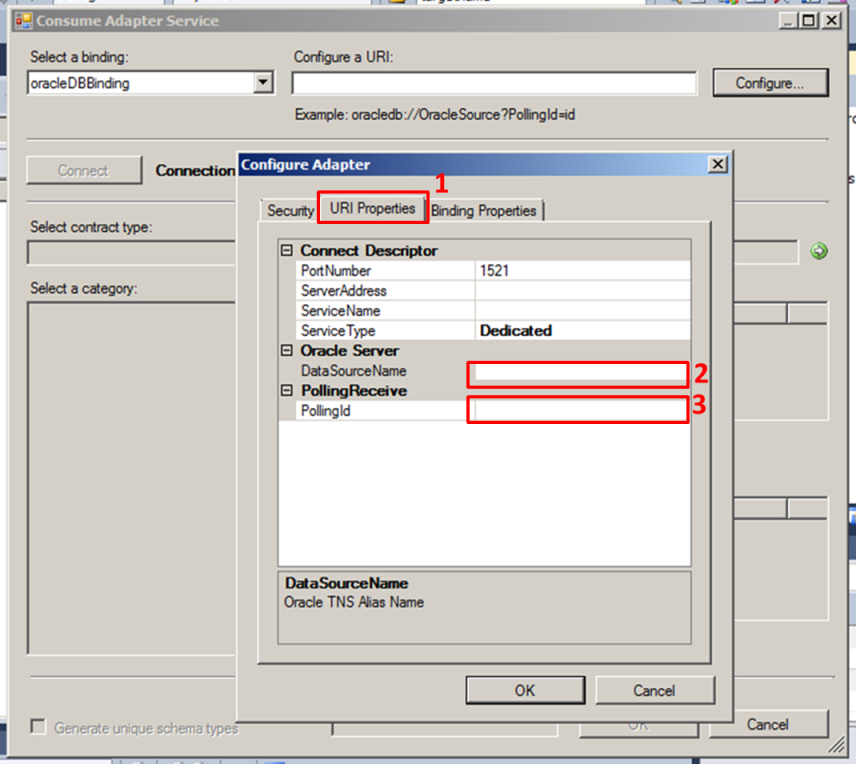
Then we have to specified the Data source name where the store procedure is, and in this case specified a polling Id, this field can be fill with anything you want, I mean you can use numbers and/or  letters.


In this step we can configure the binding properties like that:

  • Polled Data available Statement: Indicates the query which tells us if there are any data to poll.
  • Polling actions: Indicates the URL where the Store procedure is, its name looks something like that:

http://Microsoft.LobServices.OracleDB/2007/03/PP/PackageName/StoreProcedureName

  • Polling statement: It is a XML Code which indicates the store procedure we want to use to get the data we are looking for, and the parameters we have to send to it to get the information. Here is very important that all the fields are in capital letter, if not we are going to get and error.

<StoreProcedureName xmlns=”http://Microsoft.LobServices.OracleDB/2007/03/USER/Package/NamePackage”>

<PARAMETER1>12</ PARAMETER1>

< PARAMETER2>Evento</ PARAMETER2>

</ StoreProcedureName >


Remember  the name of the field or parameter is in capital letter, otherwise you get and error when you run the application.

When you have imported the schemas, you have to build and deploy the application in visual studio. Then in Biztalk Server Administration console you have to import the binding which was generated when you import the schemas.


Filed Under: BizTalk, BizTalk 2010 configurations, BizTalk Application

Leave a Reply Cancel reply

Your email address will not be published. Required fields are marked *

Blog Authors

avatar for Marco Antonio Hernández PradoMarco Antonio Hernández Prado
avatar for Jaime Alonso Páez torresJaime Alonso Páez torres
avatar for Luis Carlos Bernal ÁvilaLuis Carlos Bernal Ávila
avatar for Ana María Orozco ZuluagaAna María Orozco Zuluaga
avatar for Juan Camilo Zapata MontúfarJuan Camilo Zapata Montúfar
avatar for Sonia Elizabeth Soriano ContrerasSonia Elizabeth Soriano Contreras
avatar for Diana Díaz GrijalbaDiana Díaz Grijalba
avatar for Carlos Alberto Rueda ValenzuelaCarlos Alberto Rueda Valenzuela
avatar for Bernardo Enrique Cardales AcuñaBernardo Enrique Cardales Acuña
avatar for Alexandra Bravo RestrepoAlexandra Bravo Restrepo
avatar for Juan Alberto Vélez CasadiegoJuan Alberto Vélez Casadiego
avatar for Jhon Jairo RodriguezJhon Jairo Rodriguez
avatar for Diana Paola Padilla BeltránDiana Paola Padilla Beltrán
avatar for Alejandro Garcia ForeroAlejandro Garcia Forero
avatar for Gustavo Adolfo Echeverry LópezGustavo Adolfo Echeverry López
avatar for Jesús Javier Hernández LópezJesús Javier Hernández López
avatar for Yully Arias CastilloYully Arias Castillo
avatar for Brayan RuizBrayan Ruiz
avatar for Carlos Andrés Vélez CasadiegoCarlos Andrés Vélez Casadiego
avatar for Odahir Rolando Salcedo TangarifeOdahir Rolando Salcedo Tangarife
avatar for Josué Leonardo Bohórquez MorenoJosué Leonardo Bohórquez Moreno
avatar for Natalia Zartha SuárezNatalia Zartha Suárez
avatar for Oscar Alberto Urrea MartinezOscar Alberto Urrea Martinez
avatar for Jimmy Quejada MenesesJimmy Quejada Meneses
avatar for Carolina Torres RodríguezCarolina Torres Rodríguez
avatar for Mario Andrés CortésMario Andrés Cortés
avatar for Juan Mauricio García TorresJuan Mauricio García Torres
avatar for Eric Yovanny Martinez GonzalezEric Yovanny Martinez Gonzalez

Categories

  • .NET (33)
  • Analysis Services (1)
  • ASP.NET MVC (2)
  • Azure (7)
  • BAM (9)
  • BAM PrimaryImport (3)
  • BigData (1)
  • BizTalk (77)
  • BizTalk 2010 configurations (57)
  • BizTalk Application (60)
  • BizTalk Services (13)
  • Business Intelligence (4)
  • Cloud (3)
  • CMD (1)
  • CodeSmith – NetTiers (2)
  • CommandPrompt (1)
  • CRM OptionSet mapping component (1)
  • Desarrollo de software (6)
  • develop (6)
  • developers (3)
  • DropBox (1)
  • Dynamics (1)
  • Enterprise Architect (1)
  • Entity Framework (1)
  • Errores BizTalk (2)
  • ESB (27)
  • ETL (1)
  • Event Viewer (1)
  • Excel Services (1)
  • Foreach loop container (1)
  • General (4)
  • Gerencia de Proyectos (2)
  • Google (1)
  • Grouped Slices (1)
  • Human Talent (1)
  • IIS (4)
  • Integración (6)
  • Integration Services (3)
  • KingswaySoft (1)
  • Lync (1)
  • MSE (13)
  • Office 365 (2)
  • Oracle Data Adapter (2)
  • Performance Point (4)
  • Picklist (1)
  • Pivot Table (1)
  • Procesos (1)
  • Pruebas (1)
  • Public Website (2)
  • Reports (1)
  • SCRUM (1)
  • SDK (2)
  • SEO (1)
  • Servicios (2)
  • Sharepoint (9)
  • SharePoint 2010 (10)
  • SharePoint 2013 (4)
  • SharePoint Online (2)
  • SharpBox (1)
  • Shortcuts (1)
  • Sin categoría (1)
  • SOA (50)
  • SQL (5)
  • SQL Server (3)
  • SQL Server Management Studio (1)
  • SSIS (3)
  • SSL (1)
  • SSO (1)
  • Tracking Profile Editor (2)
  • Twitter (1)
  • Uncategorized (1)
  • Virtual Network (2)
  • Visual Studio 11 (1)
  • Visual Studio 2010 (2)
  • Visual Studio Online (1)
  • VMware (2)
  • WCF (24)
  • Web (1)
  • Web Api (1)
  • Windows (5)
  • Windows 8 (11)
  • Windows Azure (2)
  • Windows Live Write (1)
  • Windows Phone (7)
  • Windows Phone 8 (1)
  • Windows Scheduler (1)
  • windows8 (2)
  • WindowsRT (3)
  • WP7 SDK (1)

Manage

  • Log in
  • Entries feed
  • Comments feed
  • WordPress.org