
iT Synergy Blogs

Growing Innovation - Soluciones a problemas reales

  • Facebook
  • Instagram
  • LinkedIn
  • Phone
  • Twitter
  • YouTube

Copyright © 2026 · iT Synergy·

‘Query timeout expired’ when trying to display a preview in a OLE DB Source Editor
‘Query timeout expired’ when trying to display a preview in a OLE DB Source Editor avatar

December 1, 2011 By Juan Alberto Vélez Casadiego Leave a Comment

When we try to preview the 200 rows in a OLE DB Source Editor of Integration Services, maybe we can find this message error.
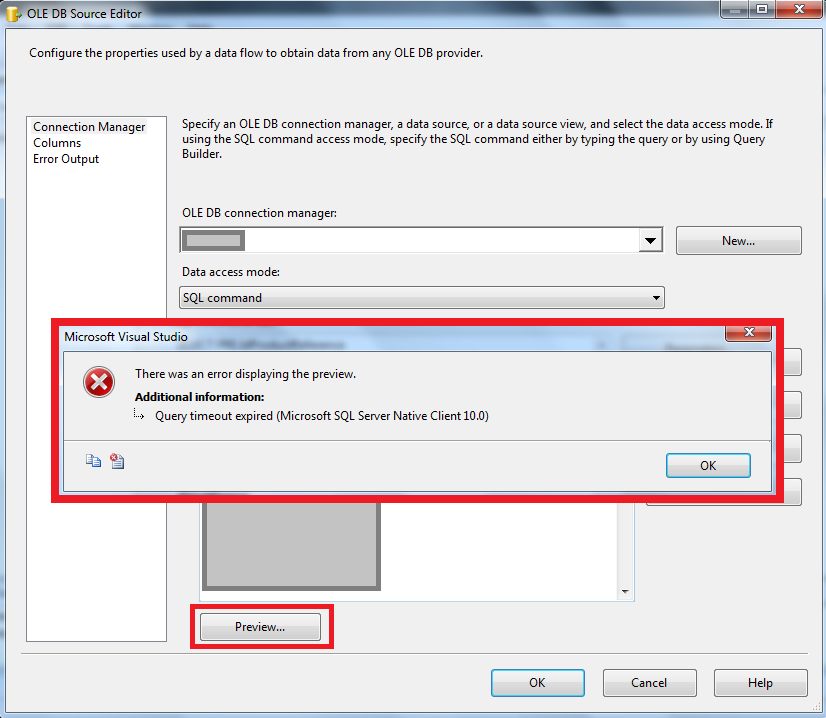
This happens when the query take more than 30 seconds to preview the data. By the moment, there is no option to increment the time to wait in Integration Services. In this case, press OK and continue working normally.

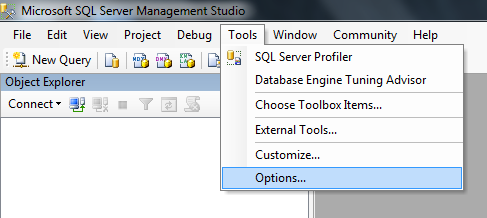
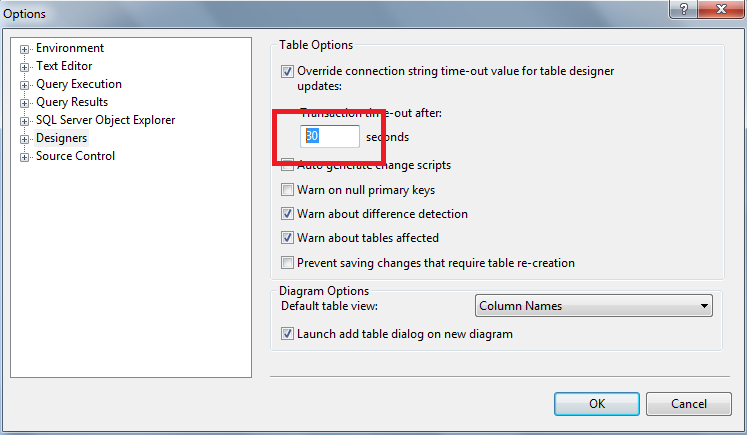
But if we want to view the data in SQL Server Management Studio, and see the same error. You need to increment the time of waiting in Tools/Options…/Designers, In the right panel we can see the option ‘Transaction time-out after’.. Change the seconds between 1-65535 and press OK.
We can see that the value of the seconds is 30 by default.
That’s all for today. See you!

Filed Under: Integration Services, SQL Server Management Studio

Team


Marco
Antonio HernĂĄndez

Jaime
Alonso PĂĄez

Luis
Carlos Bernal

Ana
MarĂ­a Orozco

Juan
Camilo Zapata

Carlos
Alberto Rueda

Diana
DĂ­az Grijalba

Sonia
Elizabeth Soriano

Bernardo
Enrique Cardales

Alexandra
Bravo Restrepo

Juan
Alberto Vélez

Jhon
Jairo Rodriguez

Diana
Paola Padilla

JesĂșs
Javier HernĂĄndez

Yully
Arias Castillo

Brayan
Ruiz

Carlos
Andrés Vélez

Alejandro
Garcia Forero

Gustavo
Adolfo Echeverry

Natalia
Zartha SuĂĄrez

Josué
Leonardo BohĂłrquez

Oscar
Alberto Urrea

Odahir
Rolando Salcedo

Jimmy
Quejada Meneses

Juan
Mauricio GarcĂ­a

Eric
Yovanny Martinez

Mario
Andrés Cortés

Carolina
Torres RodrĂ­guez

Categories

  • .NET (33)
  • Analysis Services (1)
  • ASP.NET MVC (2)
  • Azure (7)
  • BAM (9)
  • BAM PrimaryImport (3)
  • BigData (1)
  • BizTalk (77)
  • BizTalk 2010 configurations (57)
  • BizTalk Application (60)
  • BizTalk Services (13)
  • Business Intelligence (4)
  • Cloud (3)
  • CMD (1)
  • CodeSmith – NetTiers (2)
  • CommandPrompt (1)
  • CRM OptionSet mapping component (1)
  • Desarrollo de software (6)
  • develop (6)
  • developers (3)
  • DropBox (1)
  • Dynamics (1)
  • Enterprise Architect (1)
  • Entity Framework (1)
  • Errores BizTalk (2)
  • ESB (27)
  • ETL (1)
  • Event Viewer (1)
  • Excel Services (1)
  • Foreach loop container (1)
  • General (4)
  • Gerencia de Proyectos (2)
  • Google (1)
  • Grouped Slices (1)
  • Human Talent (1)
  • IIS (4)
  • IntegraciĂłn (6)
  • Integration Services (3)
  • KingswaySoft (1)
  • Lync (1)
  • MSE (13)
  • Office 365 (2)
  • Oracle Data Adapter (2)
  • Performance Point (4)
  • Picklist (1)
  • Pivot Table (1)
  • Procesos (1)
  • Pruebas (1)
  • Public Website (2)
  • Reports (1)
  • SCRUM (1)
  • SDK (2)
  • SEO (1)
  • Servicios (2)
  • Sharepoint (9)
  • SharePoint 2010 (10)
  • SharePoint 2013 (4)
  • SharePoint Online (2)
  • SharpBox (1)
  • Shortcuts (1)
  • Sin categorĂ­a (1)
  • SOA (50)
  • SQL (5)
  • SQL Server (3)
  • SQL Server Management Studio (1)
  • SSIS (3)
  • SSL (1)
  • SSO (1)
  • Tracking Profile Editor (2)
  • Twitter (1)
  • Uncategorized (1)
  • Virtual Network (2)
  • Visual Studio 11 (1)
  • Visual Studio 2010 (2)
  • Visual Studio Online (1)
  • VMware (2)
  • WCF (24)
  • Web (1)
  • Web Api (1)
  • Windows (5)
  • Windows 8 (11)
  • Windows Azure (2)
  • Windows Live Write (1)
  • Windows Phone (7)
  • Windows Phone 8 (1)
  • Windows Scheduler (1)
  • windows8 (2)
  • WindowsRT (3)
  • WP7 SDK (1)

Manage

  • Log in
  • Entries feed
  • Comments feed
  • WordPress.org